
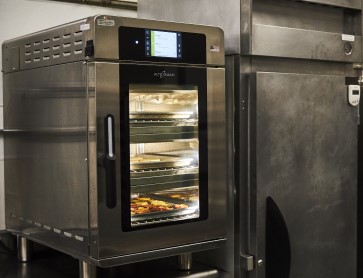
Alto-Shaam Vector Oven Troubleshooting and Maintenance Tips
By Pat Finley – Master Certified Lead Technician
Alto-Shaam’s Vector® oven is a powerful multi-cook commercial oven designed for efficiency and flexibility. With 2, 3, or 4 independent cooking zones, operators can prepare multiple items at different temperatures—all in one unit.
Each zone includes its own blower and heating elements. This allows hot air to circulate from both the top and bottom, resulting in faster cook times and consistent results.
Many Vector ovens are also ventless and compact, making them ideal for kitchens with limited space.
Because of their advanced design, proper Vector oven maintenance and troubleshooting is important to keep them performing at their best.
Common Alto-Shaam Vector Oven Issues and How to Troubleshoot
If your oven is not operating correctly, there are a few things you can check before scheduling service.
Blank or Black Screen
If your oven will not power on:
-
Verify the unit is plugged in
-
Check that the circuit breaker is on
-
Confirm the disconnect switch on the back of the oven is in the “on” position
-
Press the power button
If the screen remains blank after these checks, contact a professional technician for service.
Zone or Shelf Not Heating
Each zone operates independently, so one section may not heat if it is not set correctly.
Check the following:
-
Ensure the zone is set to preheat
-
Confirm a cooking program is selected
If the zone is set correctly but still not heating:
-
Check if the blower is running
-
If the blower is not running, the zone will not heat
-
If the blower is running but no heat is present, there may be an issue with the heating circuit
This type of repair should be handled by a factory-trained technician.
Door Handle Light Not Turning On
The door handle light is tied to the oven’s operating status.
-
The light will be off if the oven is not in an active cooking cycle
-
The light may also be disabled in the settings
If the oven is actively cooking and the light is enabled but still not working, service may be required.
Cooling Fans and Airflow Issues
Vector ovens rely on multiple cooling fans to protect internal components.
To maintain proper airflow:
-
Locate the mesh filters on the back of the unit
-
Remove and clean filters regularly
-
Ensure filters are fully dry before reinstalling
Clogged filters can cause overheating and lead to avoidable service issues.
Cooling fans should always be running when the oven is on. If they are not, the unit may require service.
When to Schedule Vector Oven Service
If troubleshooting steps do not resolve the issue, it’s important to schedule professional service.
General Parts provides expert Alto-Shaam oven repair and commercial kitchen equipment maintenance performed by manufacturer-trained technicians.
Contact your local General Parts branch to schedule service and keep your Vector oven running efficiently.